


You want the best usb 3.0 camera module for your work or creative projects. Choosing the right camera module can really change your results. Professionals and creators want high quality, fast frame rates, and easy compatibility. Special features like zoom and low-light performance help you get the shot you need. The right camera gives you clear pictures and smooth video, whether you stream, teach, or make content.
Key Takeaways
-
Pick a camera module with high resolution for clear pictures and smooth videos.
-
Check for features like fast frame rates and good low-light performance to make your projects better.
-
Make sure the camera works with your devices by choosing plug-and-play USB 3.0 cameras.
-
Think about special features like zoom lenses and settings you can change for better results.
-
Look at prices and value to find a camera that fits your budget and does what you need.
Key Criteria for USB 3.0 Camera Module Selection
Image Quality & Sensor Performance
You want your camera module to give you clear pictures. The sensor and resolution help make images sharp. Good cameras also work well in low light. Many professionals pick modules with at least 1080p resolution. Creators who need more detail often use 4K. Sensors like Sony’s IMX678 or OmniVision’s chips show bright colors and strong performance. These sensors work well even when the light is not great.
Here’s a quick look at how top brands compare:
| Brand | Key Features |
|---|---|
| Sony Corporation | Premium modules, excellent image quality, low-light performance |
| OmniVision Technologies | High-resolution sensors, broad product portfolio |
| e-Con Systems | Customized USB camera solutions for industrial and medical markets |
Sensor technology, like back-illuminated designs and bigger pixels, helps cameras do better in low light and gives better pictures.
Frame Rate & Video Output
Frame rate makes your video look smooth. If you stream or record fast action, you need high frame rates. Many USB 3.0 camera modules can do 60fps or 120fps at lower resolutions. Higher frame rates mean motion looks fluid and action shots are clearer.
Check out this chart comparing max frame rates for different video formats:
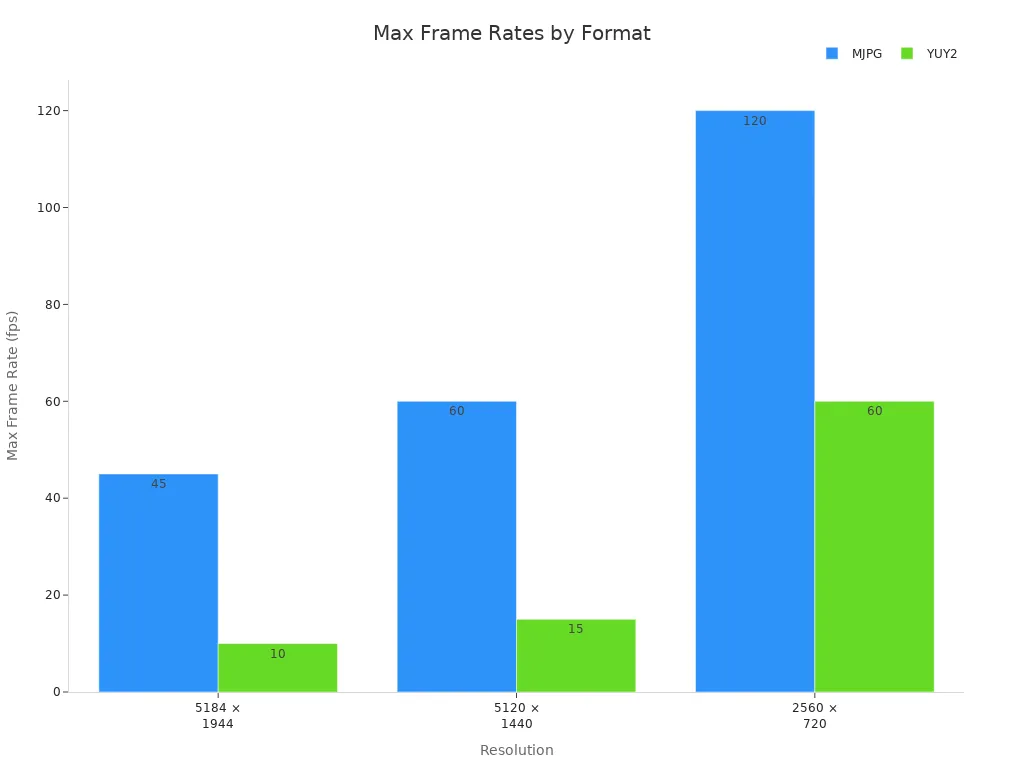
Picking the right frame rate helps balance video quality and storage space.
Compatibility & Connectivity
You want your camera module to work with your devices easily. Most USB 3.0 camera modules are plug-and-play and support UVC compliance. This means you can use them with Windows, Linux, and Android without extra drivers. Dual outputs, like USB Type-C and HDMI, let you connect to monitors or computers.
Here’s a quick compatibility table:
| Operating System | Compatibility |
|---|---|
| Linux | Yes |
| Windows Embedded | Yes |
| Android | Yes |
| UVC Compliance | Yes |
Special Features & Lens Options
Special features make high-end camera modules stand out. You might want a zoom lens, wide-angle lens, or macro lens. Some modules let you change lenses for different jobs. Adjustable aperture, focus lock, and IR correction help you get the best shot in any light.
Tip: Make sure your lens fits the sensor size. This helps you avoid vignetting and distortion.
Price & Value
Price is important, but so is value over time. Camera modules range from basic HD models to advanced 4K units. Higher prices usually mean better image quality, more features, and stronger build quality. Professionals compare cost with performance, durability, and how well the camera fits their workflow.
Here’s a quick price comparison:
| Type | Resolution | Best Use Case | Image Quality | Price Range |
|---|---|---|---|---|
| HD (720p) | 1280×720 | Basic video calls, home use | Good | $–$$ |
| Full HD | 1920×1080 | Remote work, online teaching | Excellent | $$ |
| 4K Ultra HD | 3840×2160 | Content creation, streaming | Outstanding | $$$ |
You get what you pay for, so think about your needs. Pick a camera module that fits your budget and goals.
Top USB 3.0 Camera Modules for 2026
ELP USB 3.0 HDMI Camera
This camera module gives you clear video. It works in many places. The ELP USB 3.0 HDMI Camera is special because it has high resolution. It performs well and is good for streaming, meetings, school, and creative work. It uses new camera technology to make sharp pictures and smooth video.
Here are its main features and specs:
| Feature/Specification | Description |
|---|---|
| High-resolution imaging | Video looks clear and detailed, great for professionals. |
| Advanced processing capabilities | Reduces noise and makes edges sharper for better pictures. |
| Control interfaces | Lets you change settings like exposure and gain. |
| Compatibility | Works with Windows and Linux, easy to use. |
| Remote configuration | You can adjust settings and update firmware in real time. |
| Software development kit availability | Lets you make custom apps and connect to security platforms. |
| Compression standards | Supports many codecs for smooth network use. |
| Digital image stabilization | Keeps video steady even if there is shaking. |
You can use this camera for live streaming, video calls, indoor security, and creative projects. It gives high-quality video and works well in low light. The strong build means it works reliably.
| Feature | Description |
|---|---|
| 4K Ultra HD Video Capture | 3840x2160 resolution at 30 FPS, good for streaming and meetings. |
| Premium Imaging Sensor & Lens | Sony CMOS IMX317 sensor and 180-degree fisheye lens for wide view. |
| Versatile USB Connectivity | Plug-and-play with Windows, Mac, and Linux, good for remote work. |
| Robust Build & Reliable Performance | Runs cool and meets U.S. standards. |
| Flexible Use Cases | Use for security, creative work, remote jobs, and more. |
Tip: If you need a camera for streaming or teaching, this one is flexible and performs well.
Arducam IMX296 Global Shutter Module
This camera module captures fast-moving things without blur. The Arducam IMX296 Global Shutter Module uses a special sensor to catch details quickly. It is great for technical and industrial jobs.
| Feature | Details |
|---|---|
| Sensor Type | 1.58MP color global shutter |
| Resolution | 1456×1088 |
| Frame Rate | Up to 44fps |
You can use this camera for machine vision, security, 3D scanning, live streaming, and video calls. It works well where you need fast and clear pictures. The global shutter makes sure images are sharp even when things move fast.
-
Machine Vision
-
Video Surveillance
-
3D Scanning and Metrology
-
Live Streaming
-
Video Conferencing
This camera gives you clear pictures and works well in tough places.
e-con Systems High-Resolution USB 3.0 Camera
This camera module handles high resolution and fast frame rates. The e-con Systems High-Resolution USB 3.0 Camera fits many professional needs. It uses new camera technology and performs strongly.
| Feature | Specification |
|---|---|
| Frame Rate | Full HD @ 60 fps, 4K @ 30 fps, VGA @ 120 fps |
| Output Format | Uncompressed UYVY and Compressed MJPEG |
| Supported OS | Windows, Linux |
| iHDR Support | Yes |
| GPIO Header | 10 pin |
| External Trigger Input | Yes |
| Unique ID | Yes |
| Interface | USB 3.2 Gen 1 device |
| Connector | Type-C reversible interface connector |
| UVC Compliance | Yes |
| Sensor | AR1335 CMOS from onsemi® |
| Sensor Resolution | 13MP |
| Focus Type | Auto focus |
| Shutter Type | Electronic Rolling Shutter |
| Operating Voltage | 5V +/- 5% |
| Operating Temperature Range | -30°C to 70°C |
| Size (mm) | 80 x 15 x 9.67 (without lens) |
| Weight | 7 Grams |
| Compliance | FCC, RoHS |
You can use this camera for factory automation, medical pictures, and security systems. It gives clear images and works well in changing light. Auto exposure and HDR help you see important details.
-
Industrial Automation: Watches production lines and helps with analysis.
-
Medical Imaging: Makes pictures better in tricky lighting.
-
Surveillance Systems: Captures details for security.
Sony Premium USB 3.0 Camera Module
This usb camera module gives high resolution and works with many systems. The Sony Premium USB 3.0 Camera Module uses an 8MP back-illuminated CMOS sensor. It captures 4K Ultra HD video at 30fps. You get sharp images and smooth streaming.
| Feature/Compatibility | Description |
|---|---|
| UVC and UAC Support | Plug-and-play with Windows, Linux, macOS. |
| Resolution and Frame Rate | Works with OpenCV, GStreamer, DirectShow. |
| Driver and SDK Support | Custom development, manual exposure, white balance tuning. |
| USB Bandwidth | Needs USB 3.0 or higher for HD video streams. |
You can use this camera for making content, streaming, live monitoring, and recording. The USB 3.0 interface lets you send data fast and stream in real time. It works with many operating systems, so you can use it for different creative jobs.
-
8MP sensor for sharp pictures.
-
4K video at 30fps for smooth streaming.
-
Works with many software programs.
Leopard Imaging Dragonfly Series
This camera module adapts to many tasks. The Leopard Imaging Dragonfly Series has flexible lens options and strong performance. You can use it for robots, AI vision, and factory inspection. It supports high resolution and fast frame rates.
This camera uses new sensor technology and gives clear pictures. You can change lenses for your project. The Dragonfly Series works with Windows and Linux, so setup is easy.
-
Flexible lens options for different jobs.
-
High resolution for clear pictures.
-
Fast frame rates for smooth video.
You can use this camera in robots, machine vision, and creative work. It gives reliable performance and fits your needs.
Supertek High-Speed USB 3.0 Camera
This camera module is good for technical and industrial work. The Supertek High-Speed USB 3.0 Camera gives high resolution and fast frame rates. It uses new camera technology to capture details in tough places.
| Application Area | Specific Use Case |
|---|---|
| Industrial and Manufacturing | High-Speed Inspection, Precision Metrology, Robotics and Automation |
| Scientific and Research | Life Sciences, Material Science, Particle Physics |
| Medical and Healthcare | Surgical Imaging, Diagnostic Imaging, Ophthalmic Imaging |
| Broadcasting and Entertainment | Sports Broadcasting, Virtual Reality, Cinema Production |
| Security and Surveillance | Facial Recognition, License Plate Recognition, Wide Area Surveillance |
You can use this camera for fast inspection, science research, medical pictures, and entertainment. It gives clear images and works reliably. The fast frame rates help you catch motion and details.
Note: If you work in a lab, factory, or creative studio, this camera module helps you get the results you need.
You have many choices for usb 3.0 camera modules. Each camera module has its own strengths, like high resolution, fast frame rates, flexible lens options, and new sensor technology. You can find a camera module that fits your needs, whether you want one for streaming, factory work, or creative projects.
USB 3.0 Camera Module Comparison Table
You want to know how each camera module compares. A table helps you choose the best camera for your needs. You can quickly check resolution, sensor, frame rate, and special features. This makes picking a camera faster and easier.
Here’s a simple table with the main specs for top USB 3.0 camera modules:
| Camera Module | Resolution | Sensor Type | Frame Rate | Connectivity | Special Features | Ideal Use Cases |
|---|---|---|---|---|---|---|
| ELP USB 3.0 HDMI Camera | 4K UHD (3840x2160) | 1/1.8” IMX678 | 60fps @ 4K | USB 3.0 Type-C, HDMI | 10x zoom lens, low-light, plug-and-play | Streaming, conferencing, education |
| Arducam IMX296 Global Shutter | 1456×1088 | Global Shutter CMOS | 44fps | USB 3.0 | Fast capture, sharp images | Machine vision, security, 3D scanning |
| e-con Systems High-Res USB 3.0 | 13MP (4K, Full HD) | AR1335 CMOS | 60fps @ Full HD | USB 3.2 Gen 1 Type-C | Auto focus, HDR, trigger input | Factory automation, medical imaging |
| Sony Premium USB 3.0 Camera | 4K (8MP) | Back-illuminated CMOS | 30fps @ 4K | USB 3.0 | Wide compatibility, SDK support | Content creation, streaming, monitoring |
| Leopard Imaging Dragonfly | Up to 4K | Custom CMOS | High frame rates | USB 3.0 | Flexible lens options | Robotics, AI vision, inspection |
| Supertek High-Speed USB 3.0 | Up to 4K | High-speed CMOS | High frame rates | USB 3.0 | Fast capture, robust build | Industrial, scientific, broadcasting |
USB 3.0 camera modules give you high resolution and fast frame rates. These cameras use strong sensors, so your pictures and videos look sharp. Most connect with USB 3.0, and some also have HDMI for more options. Special features like zoom, auto focus, and HDR help you get better quality.
If you want a camera for streaming or making videos, pick one with 4K resolution and a good sensor. For technical jobs, choose a camera with global shutter or fast capture. You can find a camera that fits your project and gets the results you want.
Tip: Use this table to compare features and pick the camera module that works for you. You save time and get the quality you need.
Choosing the Right USB 3.0 Camera Module
For Professional Photography & Video
You want your camera to give clear pictures and smooth video. If you take photos or make videos for work, pick a camera with high resolution and a good sensor. You can change settings like exposure, white balance, and zoom for different lighting. Cameras with HDR help colors look better and show more detail. You can use programs like OBS or Zoom to make your camera work well for streaming. Pick a camera that works in low light so your video stays clear everywhere.
-
Make sure your camera works with your favorite software.
-
Change camera settings for different places.
-
Pick HDR support to keep your camera useful longer.
-
Check how well the camera works in low light.
For Content Creators & Streamers
You need a camera that makes your videos look great. High resolution helps your videos stand out. If you stream on Twitch or record for YouTube, you want a camera with fast frame rates and smooth video. Plug-and-play cameras are easy to use and save time. Look for cameras with zoom or wide-angle lenses to match your style. You can change settings easily and connect with USB 3.0 for fast data.
Tip: Try new camera angles and lens types to make your videos special.
For Industrial & Technical Use
People who work in factories need strong cameras. If you use robots or machines, global shutter cameras catch fast-moving things without blur. High-speed cameras help check products on fast lines. Small cameras fit in tight spots and use less power. Locking connectors and USB3 Vision make cameras work well and stay connected. See the table below for real examples:
| Application Type | Camera Type | Key Features |
|---|---|---|
| High-speed industrial | xiQ VGA model | Up to 500 FPS for optical quality control on fast production lines |
| Fast-moving objects | Global shutter cameras | Captures fast-moving objects without distortion, ideal for automation and robotics |
| Tight spaces | xiMU series | Small footprint (15 × 15 mm) and low power consumption for embedded vision |
| Industrial reliability | Locking connectors | Compliance with USB3 Vision and GenICam standards for robust performance |
For Developers & DIY Projects
If you build your own projects, you want a camera that is simple and flexible. Developers like cameras with open SDKs and lots of ways to connect. You can use your camera with programs like Python or OpenCV. Small cameras are good for robots and tiny computers. Try different sensors and lenses to fit your project. USB 3.0 cameras move data fast and work well.
Note: Try new camera settings and software to get the best results for your DIY project.
You want the best camera for your work or creative projects. Here’s what you should remember:
-
Pick a camera with high resolution and strong low-light performance.
-
Choose the right field of view for your needs.
-
Make sure your camera connects easily with USB 3.0.
-
Look for features that fit your application, like fast frame rates or zoom.
If you need more info, check product guides or user reviews. You can find the perfect camera for your next project.
FAQ
What makes USB 3.0 camera modules better than USB 2.0?
USB 3.0 lets you transfer data much faster. You get smoother video and higher resolution images. Your camera works better for streaming and recording.
Can I use a USB 3.0 camera module with my laptop?
Yes, you can. Most USB 3.0 camera modules are plug-and-play. You just connect the camera to your laptop’s USB port. It works with Windows, Linux, and Android.
Do I need special software to use these camera modules?
You don’t need special software. Most USB 3.0 camera modules support UVC. Your computer recognizes the camera right away. You can use apps like Zoom or OBS.
Which camera module is best for low-light conditions?
| Camera Module | Low-Light Performance |
|---|---|
| ELP USB 3.0 HDMI Camera | Excellent |
| Sony Premium USB 3.0 | Very Good |
You get clear images even when the light is dim.
Can I change the lens on my USB 3.0 camera module?
Some camera modules let you swap lenses. You can pick wide-angle, zoom, or macro lenses. Check the product details to see if your camera supports lens changes.
https://www.hdusbcameras.com/best-usb-3-0-camera-module-2026-professionals-creators.html

 hebrew
 French
 Russian
 Arabic